
Case Study · Document AI for CA Firms
AI-Powered Document Intelligence & CA Workflow Automation Platform
Clients simply send documents on WhatsApp. AI agents identify the client, read and classify every file, extract the key data, store it in the right workspace and prepare it for ITR, GST, TDS, KYC and audit work, while the CA team stays in control of every decision that matters.
- Industry
- Chartered accountancy & tax
- Product
- Document AI & workflow automation
- Built for
- CA firms & accounting teams
- Our role
- AI agents, OCR & workflow engineering
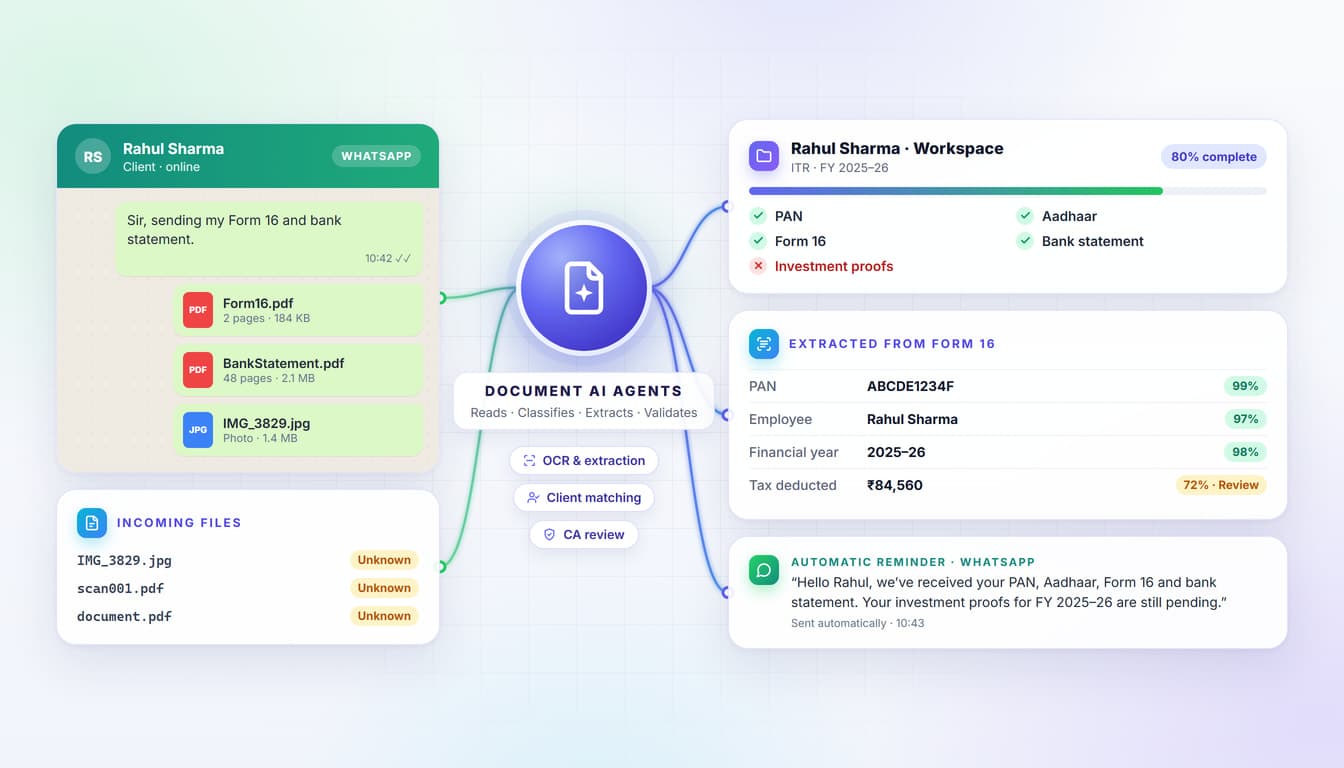
clients share documents the way they already do
11+
document types recognised automatically
5
workflows supported: ITR, GST, TDS, KYC & audit
1
dashboard showing every client’s status
The Challenge
Tax season shouldn’t mean drowning in WhatsApp attachments
CA firms receive a constant stream of PAN cards, Form 16s, bank statements, invoices and tax proofs, most of them on WhatsApp. Someone has to download each file, work out whose it is and what it contains, rename it, file it, copy the data into another system and check what is still missing.
Documents buried in WhatsApp
Client files arrive in chats, mixed with everyday messages.
File names that say nothing
IMG_3829.jpg and scan001.pdf reveal nothing about what’s inside.
Manual download & renaming
Every file saved, renamed and filed by hand.
Folders for hundreds of clients
One wrong click and a document lands in the wrong client’s folder.
Re-typing the same data
PAN, names and amounts entered again for every form.
Checking what’s missing
Staff open folder after folder to compare against checklists.
Chasing clients for documents
Repeated calls and messages for every pending file.
Blurry, duplicate & outdated files
Unreadable photos, copies and old versions slip through.
For a practice managing hundreds of clients, these steps repeat for every client, every season. The goal was to let AI handle the paperwork, so professionals can focus on professional work.
The Solution · AI Agents
An AI back office that never misses a document
A document orchestrator coordinates specialist AI agents that capture, identify, read, validate and organise every file, follow up with clients and prepare the data for filing. The CA team reviews and approves; the agents do the repetitive work.
Document orchestrator agent
Receives every document, routes it through the specialist agents in the right order and keeps each client’s workflow moving until it is ready for CA review.
- Document routing
- Client context
- Workflow state
- Escalation to humans
WhatsApp intake agent
Specialist agent
Captures documents and messages from WhatsApp the moment they arrive and replies to clients.
Client identification agent
Specialist agent
Matches every document to the right client using the phone number, PAN, GSTIN, client ID or the document itself.
Classification agent
Specialist agent
Reads the content and works out what each document is, whatever the file is called.
OCR & extraction agent
Specialist agent
Extracts names, PAN, GSTIN, amounts, dates and tax details into structured fields.
Validation agent
Specialist agent
Checks readability, completeness, financial year, expiry and consistency across documents.
Checklist & reminder agent
Specialist agent
Compares received documents with each workflow’s checklist and politely follows up on WhatsApp.
Form preparation agent
Specialist agent
Pre-fills ITR, GST, TDS and KYC workflows from verified client data, ready for CA review.
Compliance & deadline agent
Specialist agent
Detects notices, due dates and expiry dates, then creates tasks and calendar reminders.
Search & assistant agent
Specialist agent
Answers the team’s questions and finds any document using plain-language search.
What every agent is built on
Client-by-client isolation
Each document lives only in its own client’s workspace, with access controlled by role.
Human review built in
Confidence scores flag uncertain fields, so the CA team checks what matters.
Complete audit trail
Every action is recorded: who did what, when and what changed.
How the agents handle every document
- 1
Capture
Documents and messages are captured from WhatsApp as soon as they arrive.
- 2
Identify
The sender is matched to the right client and workspace.
- 3
Understand
AI reads each document, detects its type and extracts the key fields.
- 4
Validate
Quality, completeness and consistency across documents are checked.
- 5
Organise & act
Files are named and stored, checklists updated, and reminders or tasks created.
- 6
Review
The CA team reviews flagged items and approves before anything is filed.
Manual handling vs the AI platform
| Manual document handling | AI document platform |
|---|---|
| Download every attachment by hand | Documents captured from WhatsApp automatically |
| Guess what IMG_3829.jpg contains | AI reads and classifies every document |
| Type the same details again and again | Data extracted once and reused across workflows |
| Open folders to see what’s missing | Missing documents detected automatically |
| Call clients repeatedly for pending files | Friendly WhatsApp reminders sent automatically |
How It Works
From a WhatsApp message to a review-ready file
Every document follows the same journey, with each step owned by a specialist agent, and people step in only where their judgement matters.
- 1
Client sends a document on WhatsApp
Your clientNo app, portal or login needed
- 2
Document captured automatically
WhatsApp intake agentFiles and messages saved as they arrive
- 3
Client identified
Client identification agentMatched by phone number, PAN, GSTIN or client ID
- 4
AI reads the document
Classification agentContent understood, not just the file name
- 5
Document type detected
Classification agentForm 16, PAN, bank statement, invoice and more
- 6
Important information extracted
OCR & extraction agentNames, PAN, amounts, dates and tax details
- 7
Data validated
Validation agentReadability, completeness and consistency checks
- 8
Stored in the right client workspace
Orchestrator agentRenamed, filed and linked automatically
- 9
Missing documents checked
Checklist & reminder agentCompared with the workflow checklist
- 10
Form & compliance data prepared
Form preparation agentFields pre-filled from verified data
- 11
CA reviews
Your CA teamFlagged fields checked and approved
- 12
Filing & further processing
Your CA teamReady for ITR, GST, TDS, KYC or audit work
Rahul Sharma
Client · WhatsApp
- Form 16 (FY 2025–26) identified and filed in Rahul Sharma › Form 16
- Bank statement identified and filed in Rahul Sharma › Bank Statements
- ITR checklist: 4 of 5 received, investment proofs pending
WhatsApp-First Collection
Clients just send documents. The platform does the rest.
No new app, no portal, no passwords. Clients keep using the channel they already trust, while every document is matched to the right client and filed in the background.
Automatic client identification
Every document is matched to exactly one client using:
- WhatsApp number
- Client profile
- PAN
- GSTIN
- Client ID
- Document details
Once identified, the document is connected only with that client’s workspace, so files from different clients never get mixed up.
A workspace for every client
Rahul Sharma
- PAN
- Aadhaar
- Form 16
- Bank Statements
- Investment Proofs
- ITR
- GST
- Other Documents
Every other client gets a completely separate workspace: a structured environment instead of a pile of chat attachments.
Intelligent client onboarding
When a new client sends their first documents:
- 1New WhatsApp contact
- 2AI reads the PAN
- 3Name identified
- 4Client profile created
- 5Phone number linked
- 6Document checklist created
- 7Onboarding workflow starts
Document AI
From IMG_3829.jpg to structured, searchable data
File names say almost nothing. The AI looks at what each document actually contains, identifies it and extracts the information that matters.
- PAN card
- Aadhaar card
- Form 16
- Bank statements
- Salary slips
- Investment proofs
- GST documents
- Invoices
- TDS certificates
- Property documents
- Business records
AI document classification
- document.pdfForm 16
- IMG_2827.jpgPAN card
- scan_34.pdfBank statement
- invoice-final.pdfGST invoice
Smart file naming
Every file gets a meaningful name, so documents are easy to find later.
IMG_38291.jpg
RahulSharma_PAN_ABCDE1234F.pdf
invoice-final.pdf
ABCTraders_GSTInvoice_INV1024_15Mar2026.pdf
OCR & intelligent data extraction
From a PAN card
- Name
- PAN number
- Date of birth
From an invoice
- Invoice number
- Invoice date
- Vendor name
- GSTIN
- Taxable amount
- CGST / SGST / IGST
- Total amount
From a Form 16
- Employer
- Employee
- PAN
- Financial year
- Salary
- Tax deducted
Unstructured documents become structured data
- PDF / image
- AI document processing
- Structured fields
- Client name
- PAN
- GSTIN
- Financial year
- Income
- Tax amount
- Invoice date
- Document type
- Document status
Once documents become structured data, every downstream workflow can use them.
AI document summaries
A 50-page bank statement becomes a short summary that highlights:
- Statement period
- Opening balance
- Closing balance
- Large transactions
- Recurring payments
- Potentially relevant entries
It doesn’t replace professional review. It helps the CA reach important information faster.
Accuracy & Control
Automation that knows when to ask a human
Financial documents leave no room for silent mistakes. Every document is checked, uncertain fields are flagged, and the CA team stays in control.
Document validation
- Is the image readable?
- Is the document complete?
- Does the PAN belong to the expected client?
- Does the GSTIN match?
- Is the financial year correct?
- Has the document expired?
- Is any important page missing?
Anything that looks wrong is flagged for review.
Confidence scores & review queue
Illustrative example
- PANABCDE1234F99%
- Client nameRahul Sharma97%
- Invoice total₹84,56072% · Review
- High confidenceCategorised automatically
- Medium confidenceQuick verification
- Low confidenceManual review required
Cross-document validation
The AI compares information across documents:
Mismatches are flagged, so errors are caught before filing.
Image quality detection
- Blurry
- Dark
- Cropped
- Rotated
- Partially visible
Duplicate detection
Compares file content, document and invoice numbers, dates, amounts and file fingerprints.
Invoice 4582 · ₹42,500 · 15 March
Received twice → possible duplicate
Version history
- BankStatement v1
- Corrected v2
Nothing is overwritten blindly. The team always knows which version is the latest, when it arrived and who reviewed it.
Smart Follow-Ups
No more chasing clients for documents
Every workflow has its own checklist. The platform knows what has arrived, what is missing and when to remind the client, then uses the verified data to pre-fill the next form.
ITR filing
- PAN
- Aadhaar
- Form 16
- Bank statement
- Investment proofs
- Capital gain statement
GST registration
- PAN
- Aadhaar
- Address proof
- Bank proof
- Business documents
Company incorporation
- Director KYC
- PAN
- Aadhaar
- Address proof
- Company information
Missing documents, detected instantly
Illustrative example
- PANReceived
- AadhaarReceived
- Form 16Received
- Bank statementMissing
- Investment proofReceived
Automatic WhatsApp reminders
Illustrative example
Configured reminders continue until the document arrives, taking over one of the most repetitive jobs in any accounting firm.
Form auto-filling
Instead of typing the same details again, the team reviews fields that are already filled in, and stays responsible for every critical value before submission.
Verified once, reused everywhere
- Verified PAN
- Verified name
- Verified address
- Verified GSTIN
- Verified bank details
Tax & Compliance Workflows
Built around how CA firms actually work
ITR, GST, TDS, KYC and audit each need different documents and deadlines. The platform turns document processing into real workflow automation.
A structured ITR season
- Client added
- ITR checklist created
- Document request sent
- Client sends documents on WhatsApp
- AI classifies documents
- Data extracted
- Missing documents identified
- Reminder sent
- CA reviews information
- Form preparation
- Filing workflow
GST
Sales and purchase invoices, GST certificates, bank information and return documents, organised by client, financial year, month, invoice type and vendor.
TDS
Form 16, Form 16A, salary records, vendor information and TDS certificates, organised and prepared for review.
KYC
PAN, Aadhaar, address proof, bank proof and company documents tracked as received, validated, pending or rejected.
Document linking
Invoices linked to client, vendor, financial year and GST period; Form 16 linked to client, employer and assessment year.
Automatic task creation
- GST notice received
- AI identifies the document
- High-priority task created
- Team member assigned
- Deadline set
- Notification sent
Deadline & compliance tracking
- Income tax notice
- Response deadline detected
- Calendar entry created
- CA alerted
Filing dates, assessment years, due dates, certificate expiries and notice-response dates are extracted and turned into reminders, so nothing important is overlooked.
Firm-Wide Visibility
Every client’s status, one dashboard away
Partners see where every client stands, teams collaborate on the same records, and anyone can find anything by simply asking.
Client status dashboard
Illustrative example
- Rahul SharmaITR80% complete
- ABC TradersGSTDocuments pending
- XYZ Pvt LtdAuditUnder review
- Priya SinghKYCComplete
Ask the AI assistant
Plain-language questions over the firm’s authorised document data:
- Which clients still haven’t submitted Form 16?
- What documents are missing for Rahul’s ITR?
- Find invoices above ₹1 lakh for ABC Traders.
- Show GST documents received this month.
Team collaboration
- Task assignment
- Document review
- Internal comments
- Status changes
- Approval workflows
No more depending on one person who knows where every file is.
Complete activity history
- Document received
- AI classified
- Team member reviewed
- Data corrected
- Form generated
- Used for filing
Every action records who performed it, what changed and when: a clear audit trail for the practice.
Security & Privacy
Built for highly sensitive financial data
PAN, Aadhaar, bank statements and tax records demand strict separation and control. Security was designed in from the start, not added later.
Secure client data isolation
CA firm
- Client A workspaceOnly Client A documents
- Client B workspaceOnly Client B documents
- Client C workspaceOnly Client C documents
Role-based access
- AdminComplete system access
- CA / PartnerReview and approval
- EmployeeAssigned clients only
- ReviewerVerification access
Security controls
- Secure storage
- Encrypted data transfer
- Authentication
- Access controls
- Document permissions
- Activity tracking
Essential for professional financial workflows that handle identity and tax documents every day.
Impact
From manual paperwork to an intelligent document assistant
Accounting teams spend far less time managing files and far more time on professional tax, audit, advisory and compliance work.
Before
- Manual download
- Manual folder creation
- Manual data entry
- Manual follow-up
- Manual form preparation
With the AI platform
- AI document processing
- Automatic client mapping
- Structured storage
- Data extraction
- Validation
- Automatic follow-up
- Pre-filled workflow
- CA review
Less time on paperwork
Significantly less time spent downloading, renaming and filing documents.
Fewer follow-up calls
Missing documents are chased automatically on WhatsApp.
Cleaner, safer records
Every document classified, validated and stored in the right place.
More time for advisory
Professionals focus on tax, audit and advisory work instead of admin.
Key takeaway
Unstructured documents arriving on WhatsApp become organised, validated and searchable data that powers every tax and compliance workflow.
Our Work
What TechyHut Solutions delivered
We built a document intelligence and workflow automation platform designed around how Chartered Accountant firms actually operate. It is much more than document storage: an intelligent digital assistant that turns client documents arriving on WhatsApp into organised, validated, searchable and actionable information.
- Document AI
- OCR
- AI Agents
- WhatsApp Automation
- Data Extraction
- Workflow Automation
- Human-in-the-Loop
- Semantic Search
- Role-Based Access
- Audit Trails
- A team of AI agents for intake, client identification, classification, extraction, validation, reminders, form preparation, compliance and search
- WhatsApp-based document collection with automatic replies and reminders
- OCR and AI data extraction that turns PDFs and photos into structured client data
- Secure, client-wise workspaces with role-based access and a complete audit trail
- Checklists, missing-document detection and form pre-filling for ITR, GST, TDS and KYC
- Human review with confidence scores, plus natural-language search and an AI assistant for the team
Ready to take the paperwork out of your practice?
We build document AI and workflow automation for accounting, finance and compliance teams, from WhatsApp intake to review-ready forms.